12. Custom Blocks: Description Lists and Movie Runtime
Core blocks cover most layout needs, but some HTML structures have no core equivalent. Description lists (<dl>, <dt>, <dd>) and semantic time elements (<time>) are two examples. This lesson builds custom blocks for both and revisits the single templates to use them.
Learning Outcomes
- Understand a custom block's anatomy:
block.json,index.js,render.php,style.css. - Know how to build parent/child block relationships using
parentandallowedBlocks. - Be able to create a dynamic block that renders via PHP.
- Understand how
usesContextlets a block read data from the query loop. - Know how
get_block_wrapper_attributes()handles wrapper output.
To sync your theme with the finished product, run these commands:
mkdir -p themes/10up-block-theme/blocks
cp -r themes/fueled-movies/blocks/dl themes/10up-block-theme/blocks/dl
cp -r themes/fueled-movies/blocks/dl-item themes/10up-block-theme/blocks/dl-item
cp -r themes/fueled-movies/blocks/dt themes/10up-block-theme/blocks/dt
cp -r themes/fueled-movies/blocks/dd themes/10up-block-theme/blocks/dd
cp -r themes/fueled-movies/blocks/movie-runtime themes/10up-block-theme/blocks/movie-runtime
Run npm run build when complete.
Tasks
1. Copy blocks from the answer key
Copy the block directories listed above from the fueled-movies theme and rebuild.
The theme's src/Blocks.php already auto-registers any block with a block.json in the blocks/ directory, so no additional PHP registration is needed.
2. Walk through the DL block family
The description list system is a four-block hierarchy for displaying movie and person metadata:
tenup/dl              - Parent: the <dl> wrapper
└── tenup/dl-item     - Child: a term+description pair
    ├── tenup/dt      - Leaf: the <dt> term
    └── tenup/dd      - Leaf: the <dd> description (can contain other blocks)
Enforcing structure with parent and allowedBlocks
The nesting rules are defined in each block's block.json:
{
    "name": "tenup/dl-item",
    "title": "Description List Item",
    "parent": ["tenup/dl"]
}
{
    "name": "tenup/dt",
    "title": "Description List Term",
    "parent": ["tenup/dl-item"]
}
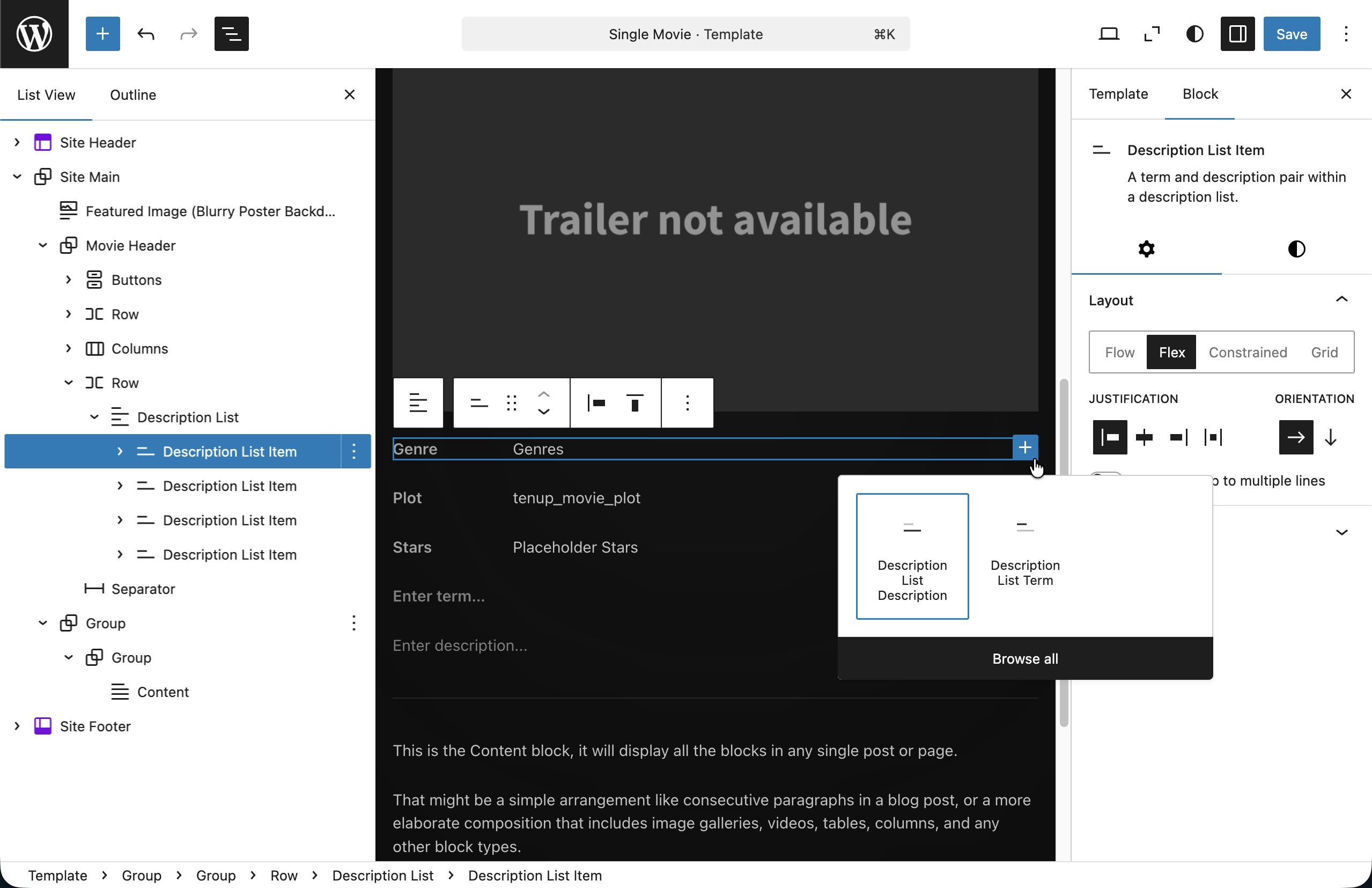
parentrestricts where a block can be inserted.tenup/dl-itemcan only exist insidetenup/dl.tenup/dtandtenup/ddcan only exist insidetenup/dl-item.*- The DL block uses
InnerBlocksto accept child blocks. The editor automatically filters the inserter to only show allowed children.
* Alternatively, there is also ancestor to be allowed at any level within a blocks nested innerblocks
Dynamic rendering with render.php
At 10up we build dynamic blocks: blocks that render on the server via PHP. The render.php file is referenced as render in block.json:
{
    "name": "tenup/dl",
    "render": "file:./render.php",
    "editorScript": "file:./index.js",
    "style": "file:./style.css"
}
The PHP render template receives three variables:
<?php
/**
 * @var array    $attributes Block attributes.
 * @var string   $content    Block content (inner blocks).
 * @var WP_Block $block      Block instance.
 */

if ( empty( trim( $content ) ) ) {
    return;
}

$block_wrapper_attributes = get_block_wrapper_attributes();
?>

<dl <?php echo $block_wrapper_attributes; ?>>
    <?php echo $content; ?>
</dl>
$attributes: the block's saved attributes (fromblock.json)$content: the rendered HTML of inner blocks (already processed by WordPress)$block: the fullWP_Blockinstance (access context via$block->contextwhenusesContextis set inblock.json)
get_block_wrapper_attributes() generates the correct wrapper attributes (classes, styles, IDs) based on block supports. Always use this instead of building class names manually.
Dynamic blocks avoid deprecation headaches: the markup isn't saved to the database, so you can change it anytime without migration scripts. This is why 10up uses dynamic blocks as the standard.
The editor component
The editor side uses useBlockProps and useInnerBlocksProps from @wordpress/block-editor:
import { registerBlockType } from '@wordpress/blocks';
import { InnerBlocks } from '@wordpress/block-editor';
import { BlockEdit } from './edit';
import metadata from './block.json';

registerBlockType(metadata, {
    edit: BlockEdit,
    save: () => <InnerBlocks.Content />,
});
For dynamic blocks, the save function returns <InnerBlocks.Content /> (if the block has inner blocks) or null (if it doesn't). The actual frontend markup comes from render.php.
Auto-registration
You don't need to manually register blocks. src/Blocks.php globs dist/blocks/*/block.json and calls register_block_type_from_metadata() for each:
public function register_theme_blocks() {
    $block_json_files = glob( TENUP_BLOCK_THEME_BLOCK_DIST_DIR . '*/block.json' );

    foreach ( $block_json_files as $filename ) {
        $block_folder = dirname( $filename );
        register_block_type_from_metadata( $block_folder );
    }
}
Drop a folder with a block.json into blocks/ and it's automatically available.
3. Walk through the Movie Runtime block
The tenup/movie-runtime block demonstrates reading data from the post via block context:
{
    "name": "tenup/movie-runtime",
    "usesContext": ["postId", "postType"],
    "render": "file:./render.php"
}
$post_id = $block->context['postId'] ?? null;
if ( ! $post_id ) {
    return;
}

$runtime = get_post_meta( $post_id, 'tenup_movie_runtime', true );
$hours   = $runtime['hours'] ?? '0';
$minutes = $runtime['minutes'] ?? '0';

if ( '0' === $hours && '0' === $minutes ) {
    return;
}
?>

<time <?php echo get_block_wrapper_attributes( [
    'datetime' => esc_attr( 'PT' . $hours . 'H' . $minutes . 'M' ),
] ); ?>>
    <?php // renders "2h 28m" with ARIA labels ?>
</time>
The usesContext declaration in block.json tells WordPress to pass postId and postType from the query loop context. This lets the block read meta for whatever post it's rendering inside, without hardcoding a post ID.
4. Revisit single templates
Update both single templates in the Site Editor to use the new blocks:
Single Movie (templates/single-tenup-movie.html):
- Wrap plot, stars, and genre in
tenup/dlblocks - Add
tenup/movie-runtimeto the metadata row
Notice how the tenup/dd blocks contain bound Paragraphs from Lesson 10. The Plot field uses core/post-meta (reading directly from meta), while the Stars field uses our custom tenup/block-bindings source (querying Content Connect relationships and returning linked names). The DL blocks provide the semantic HTML structure; the bindings provide the dynamic data.
Is it worth mentioning once more here that our bindings will still return an empty paragraph tag if they are not set (i.e. - no Plot meta or Stars relationship).
For our custom binding, we can return the fallback in our php callback if we wish, but our for our core/post-meta binding we would add our fallback here in the template.
<!-- wp:tenup/dl {"style":{"layout":{"selfStretch":"fill"}},"layout":{"type":"default"}} -->
    <!-- wp:tenup/dl-item {"layout":{"type":"flex","flexWrap":"nowrap","verticalAlignment":"top"}} -->
        <!-- wp:tenup/dt {"content":"Genre","style":{"layout":{"selfStretch":"fixed","flexSize":"5.5rem"}},"textColor":"text-secondary"} /-->
        <!-- wp:tenup/dd {"style":{"layout":{"selfStretch":"fill"}}} -->
            <!-- wp:post-terms {"term":"tenup-genre"} /-->
        <!-- /wp:tenup/dd -->
    <!-- /wp:tenup/dl-item -->

    <!-- wp:tenup/dl-item {"layout":{"type":"flex","flexWrap":"nowrap","verticalAlignment":"top"}} -->
        <!-- wp:tenup/dt {"content":"Plot","textColor":"text-secondary"} /-->
        <!-- wp:tenup/dd -->
            <!-- wp:paragraph {
                "metadata": {
                    "bindings": {
                        "content": {
                            "source": "core/post-meta",
                            "args": { "key": "tenup_movie_plot" }
                        }
                    }
                }
            } -->
            <p></p>
            <!-- /wp:paragraph -->
        <!-- /wp:tenup/dd -->
    <!-- /wp:tenup/dl-item -->

    <!-- wp:tenup/dl-item {"layout":{"type":"flex","flexWrap":"nowrap","verticalAlignment":"top"}} -->
        <!-- wp:tenup/dt {"content":"Stars","textColor":"text-secondary"} /-->
        <!-- wp:tenup/dd -->
            <!-- wp:paragraph {
                "metadata": {
                    "bindings": {
                        "content": {
                            "source": "tenup/block-bindings",
                            "args": { "key": "movieStars" }
                        }
                    }
                }
            } -->
            <p></p>
            <!-- /wp:paragraph -->
        <!-- /wp:tenup/dd -->
    <!-- /wp:tenup/dl-item -->
<!-- /wp:tenup/dl -->
Single Person (templates/single-tenup-person.html):
- Wrap biography, born, birthplace, died, deathplace, and movies in
tenup/dlblocks
Export the updated markup back to the theme files.
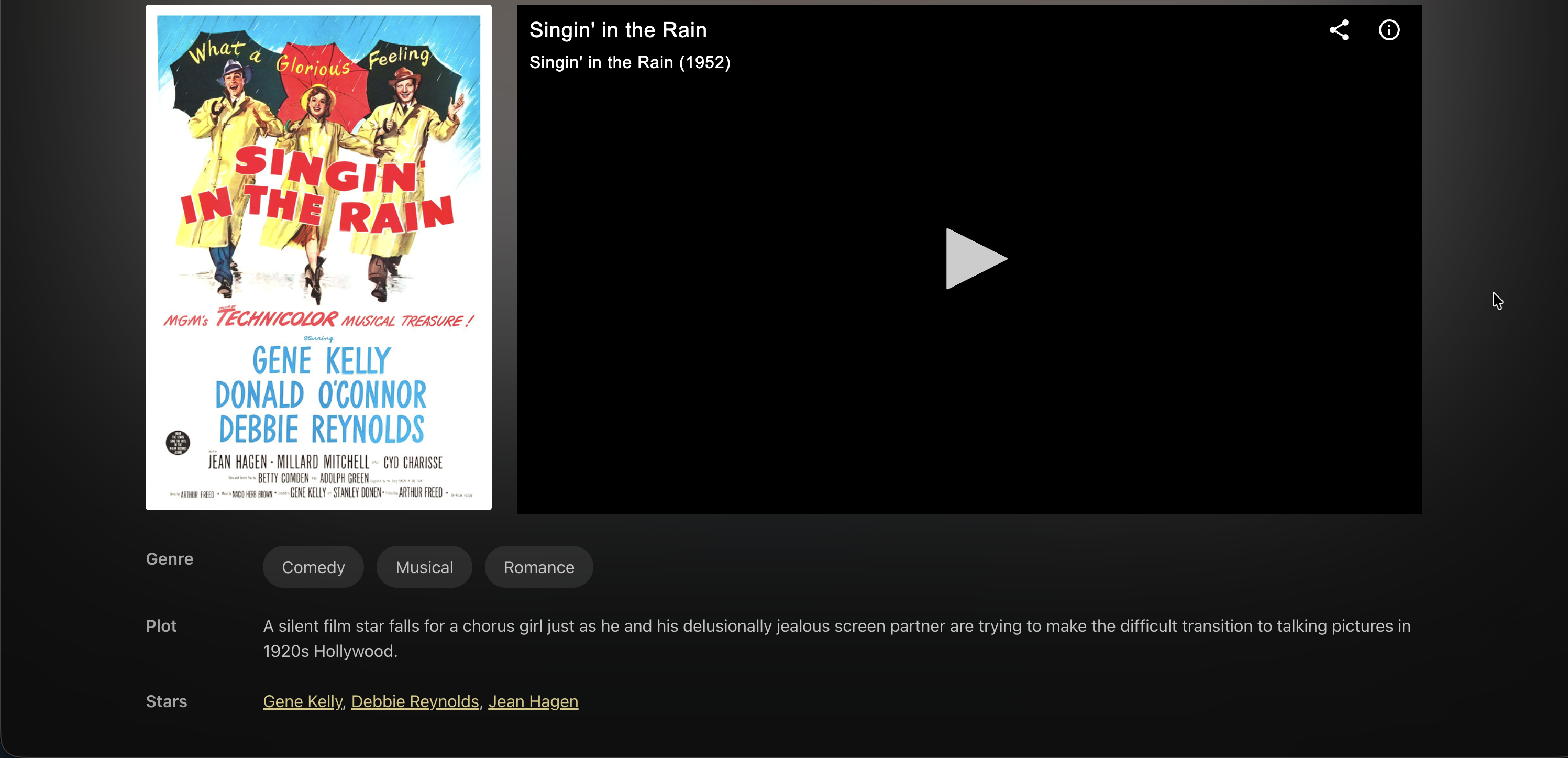 Our Description List blocks on the frontend with bound innerblock content
Files changed in this lesson
| File | Change type | What changes |
|---|---|---|
blocks/dl/ | New | Block metadata, edit component, render.php, styles |
blocks/dl-item/ | New | parent: ["tenup/dl"], render.php |
blocks/dt/ | New | parent: ["tenup/dl-item"], inline editable term |
blocks/dd/ | New | parent: ["tenup/dl-item"], inner blocks container |
blocks/movie-runtime/ | New | usesContext: ["postId", "postType"], semantic <time> output |
templates/single-tenup-movie.html | Revisited | Plot/Stars/Genre wrapped in tenup/dl blocks; tenup/movie-runtime added to metadata row |
templates/single-tenup-person.html | Revisited | All metadata paragraphs wrapped in tenup/dl blocks |
Ship it checkpoint
- DL blocks enforce nesting: only dl-item inside dl, only dt/dd inside dl-item
- Movie runtime displays as "2h 28m" with semantic
<time>element - Single movie template has DL with Genre, Plot, Stars
- Single person template has DL with Biography, Born, Birthplace, Died, Deathplace, Movies
Takeaways
- Custom blocks:
block.jsonfor metadata,index.jsfor the editor,render.phpfor the frontend. - Dynamic blocks (PHP-rendered) avoid deprecation problems: the 10up standard.
- Use
parentandallowedBlocksto enforce nesting rules in parent/child block systems. get_block_wrapper_attributes()handles wrapper classes, styles, and IDs. Always use it.usesContextinblock.jsonlets blocks read data from query loop context.- Drop a folder with
block.jsonintoblocks/and auto-registration handles the rest.