10. Block Bindings and Single Templates
The Block Bindings API (WordPress 6.5+) lets core blocks read dynamic values from a custom source: post meta, computed data, relationship queries. Instead of building a custom block for every piece of dynamic text, you bind a core Paragraph, Heading, Button, or Image to a data source and let WordPress handle the rendering.
In this lesson you'll register a custom binding source and build the single movie and person templates.
Learning Outcomes
- Understand the Block Bindings API: what it does, which blocks support it, and its limitations.
- Know how to register a custom binding source in PHP with a callback.
- Know how to register an editor-side preview so bindings show placeholder text while editing.
- Know the difference between
core/post-meta(simple fields) and a custom source (computed values). - Be able to build single post templates that use bindings for dynamic content.
To sync your theme with the finished product, run these commands and then add import './block-bindings'; to assets/js/block-extensions.js:
cp themes/fueled-movies/src/BlockBindings.php themes/10up-block-theme/src/BlockBindings.php
mkdir -p themes/10up-block-theme/assets/js/block-bindings
cp themes/fueled-movies/assets/js/block-bindings/index.js themes/10up-block-theme/assets/js/block-bindings/index.js
cp themes/fueled-movies/patterns/single-movie-trailer.php themes/10up-block-theme/patterns/single-movie-trailer.php
mkdir -p themes/10up-block-theme/patterns/images
cp themes/fueled-movies/patterns/images/placeholder.png themes/10up-block-theme/patterns/images/placeholder.png
cp themes/fueled-movies/templates/single-tenup-movie.html themes/10up-block-theme/templates/single-tenup-movie.html
cp themes/fueled-movies/templates/single-tenup-person.html themes/10up-block-theme/templates/single-tenup-person.html
Run npm run build when complete.
Tasks
1. Copy files from the answer key
Copy the files listed above from the fueled-movies theme, add the block-bindings import to block-extensions.js, and rebuild.
2. Walk through the PHP binding source
Open src/BlockBindings.php. This module follows the same ModuleInterface pattern from Lesson 6.
The registration:
public function register_block_bindings() {
    // Register a custom binding source with a unique name and a callback
    // that WordPress will call whenever a block uses this source.
    register_block_bindings_source(
        'tenup/block-bindings',
        array(
            'label'              => __( 'Fueled Movies Theme', 'tenup-block-theme' ),
            'get_value_callback' => [ $this, 'block_bindings_callback' ],
        )
    );
}
The callback receives $source_args (from the block's metadata.bindings attribute) and routes to helper methods:
public function block_bindings_callback( $source_args ) {
    if ( ! isset( $source_args['key'] ) ) {
        return null;
    }

    // Route to different helper methods based on which key the
    // binding is using in its args (set in the template markup).
    switch ( $source_args['key'] ) {
        case 'archiveLinkText':
            return $this->get_archive_link( 'text' );
        case 'archiveLinkUrl':
            return $this->get_archive_link( 'url' );
        case 'movieStars':
            return $this->get_movie_stars();
        case 'personBorn':
            return $this->get_person_born();
        case 'personDied':
            return $this->get_person_died();
        case 'personMovies':
            return $this->get_person_movies();
        case 'viewerRatingLabelText':
            return $this->get_viewer_rating_label( 'text' );
        case 'viewerRatingLabelTextNumberOnly':
            return $this->get_viewer_rating_label( 'number' );
        case 'viewerRatingLabelUrl':
            return $this->get_viewer_rating_label( 'url' );
        default:
            return null;
    }
}
Example: movieStars
The movieStars binding queries Content Connect for related People and returns comma-separated linked names:
private function get_movie_stars() {
    $value   = '';
    $post_id = get_the_ID();

    // Bail early if Content Connect isn't available.
    if ( ! $post_id || ! function_exists( '\TenUp\ContentConnect\Helpers\get_related_ids_by_name' ) ) {
        return $value;
    }

    // Query the Content Connect relationship for related Person post IDs.
    $star_ids = \TenUp\ContentConnect\Helpers\get_related_ids_by_name( $post_id, 'movie_person' );

    if ( empty( $star_ids ) ) {
        return $value;
    }

    // Fetch the Person posts and build linked name strings.
    $stars_query = new \WP_Query( [
        'post_type'      => Person::POST_TYPE,
        'post__in'       => $star_ids,
        'orderby'        => 'post__in',
        'posts_per_page' => 99,
    ] );

    $star_links = array_map( function ( $star ) {
        return sprintf( '<a href="%s">%s</a>', esc_url( get_permalink( $star->ID ) ), esc_html( $star->post_title ) );
    }, $stars_query->posts );

    // Return comma-separated linked names (e.g. "Al Pacino, Robert De Niro").
    return implode( ', ', $star_links );
}
Use core/post-meta for straightforward meta display. Use a custom binding source when you need computed values, relationship queries, formatted output, or fallback logic.
3. Walk through the JS editor preview
Block bindings have two halves:
- PHP source: returns real values for the frontend
- JS source: returns placeholder values for the editor preview
Both share the same source name (tenup/block-bindings). WordPress uses the JS source in the editor and the PHP source on the frontend.
import { registerBlockBindingsSource } from '@wordpress/blocks';

// Register the JS-side source that mirrors the PHP source.
// WordPress uses this in the editor; the PHP callback runs on the frontend.
registerBlockBindingsSource({
    name: 'tenup/block-bindings',
    label: 'Fueled Movies Theme',
    usesContext: ['postId', 'postType'],

    // Return placeholder values so editors see realistic content in the canvas.
    // The key in bindings.content/text/url.args.key matches the PHP switch cases.
    getValues({ bindings }) {
        if (bindings.content?.args?.key === 'movieStars') {
            return { content: 'Placeholder Stars' };
        }
        if (bindings.content?.args?.key === 'personBorn') {
            return { content: 'January 1, 1970' };
        }
        if (bindings.text?.args?.key === 'archiveLinkText') {
            return { text: '← Back' };
        }
        if (bindings.url?.args?.key === 'archiveLinkUrl') {
            return { url: '#' };
        }
        // ... more keys
        return {};
    },

    // Make bindings discoverable in the editor UI (Block Bindings panel).
    getFieldsList() {
        return [
            { label: 'Archive Link Text', type: 'string', args: { key: 'archiveLinkText' } },
            { label: 'Movie Stars', type: 'string', args: { key: 'movieStars' } },
            // ... more fields
        ];
    },
});
getValues() provides placeholder text so editors see meaningful content in the canvas. getFieldsList() makes bindings discoverable in the editor UI.
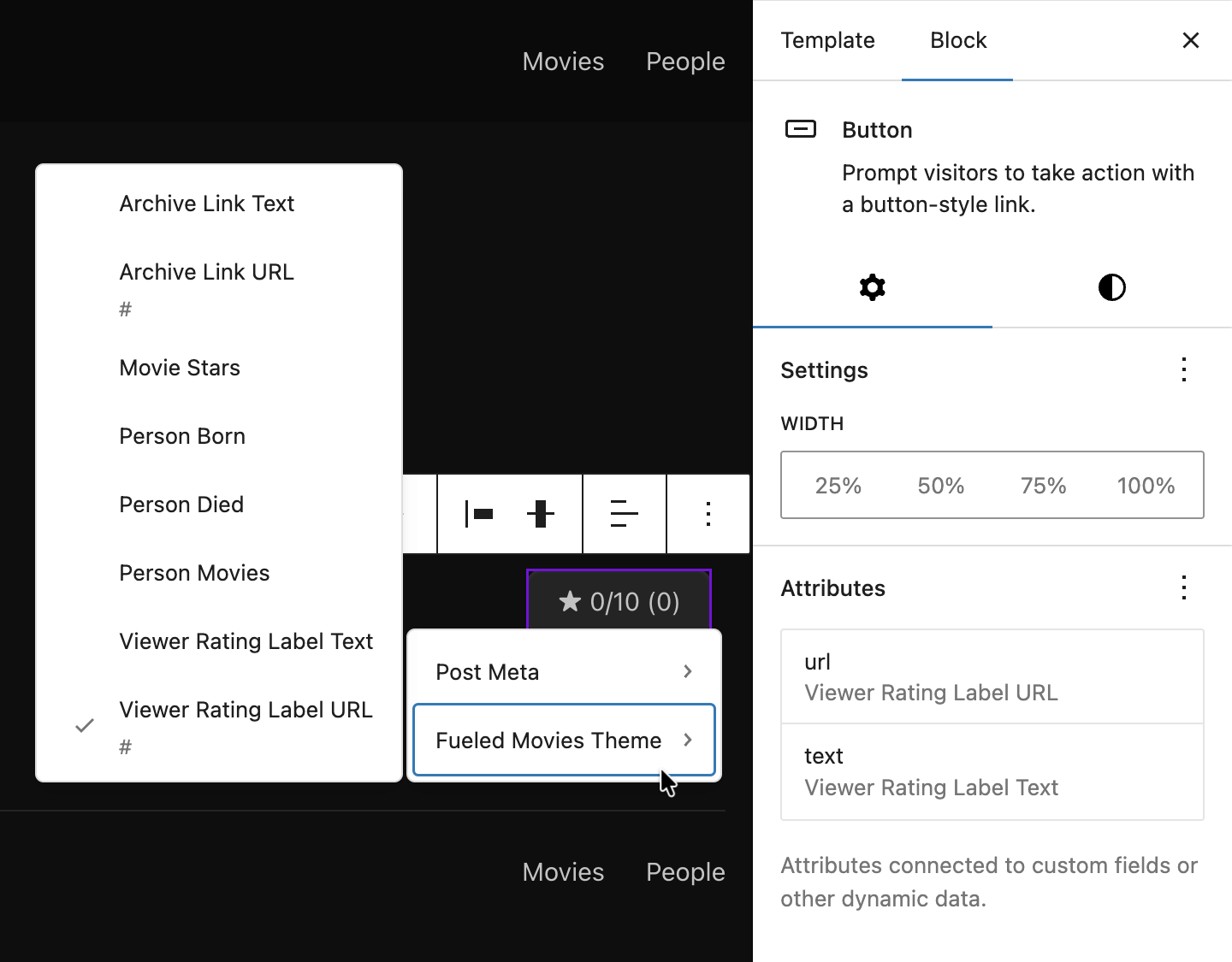 The Attributes panel of the Button block where we connect our bindings in the Single Movie template
Keep placeholder text realistic so editors understand what will render. "Placeholder Stars" is better than "Loading..." because it communicates the shape of the content.
Which blocks support bindings?
These core blocks have built-in binding support:
| Block | Bindable properties |
|---|---|
| Paragraph | content |
| Heading | content |
| Button | text, url, linkTarget, rel |
| Image | id, url, alt, title, caption |
| Post Date | datetime |
| Navigation Link | url |
| Navigation Submenu | url |
Extending bindings to any block
As of WordPress 7.0, bindings are no longer limited to this built-in list. The block_bindings_supported_attributes filter lets any block, including custom blocks, opt into binding support. Any block attribute that supports bindings also supports Pattern Overrides, meaning editors can override bound values per-instance in synced patterns.
// Allow a custom block's "heading" attribute to support bindings and pattern overrides.
add_filter(
    'block_bindings_supported_attributes',
    function ( $supported_attributes, $block_name ) {
        if ( 'my-plugin/my-block' === $block_name ) {
            $supported_attributes[] = 'heading';
        }
        return $supported_attributes;
    },
    10,
    2
);
What else the attribute needs depends on how your block renders:
- Dynamic blocks (blocks with a
render_callback): the filter is all you need. WordPress merges bound values into$attributesbefore calling your callback, so your PHP receives the correct values automatically. - Static blocks (blocks with saved HTML): the attribute must also have a
source(html,rich-text, orattribute) andselectorinblock.jsonso WordPress knows where in the saved markup to inject the bound value. Without these, the bound value is silently ignored.
You may see role: "content" on block.json attributes. This controls a separate concern: whether the block stays editable inside content-locked containers (like synced patterns with templateLock: "contentOnly"). It is good practice to add "role": "content" to bindable attributes, but it is not required for bindings to work.
4. Understand binding markup in templates
In template markup, bindings are added via the metadata.bindings attribute on a block.
core/post-meta for simple fields:
<!-- Simple: bind paragraph content directly to a post meta field. -->
<!-- wp:paragraph {
    "metadata": {
        "bindings": {
            "content": {
                "source": "core/post-meta",
                "args": { "key": "tenup_movie_release_year" }
            }
        }
    }
} -->
<p></p>
<!-- /wp:paragraph -->
tenup/block-bindings for computed values:
<!-- Custom source: the PHP callback computes the value (e.g. querying related posts). -->
<!-- wp:paragraph {
    "metadata": {
        "bindings": {
            "content": {
                "source": "tenup/block-bindings",
                "args": { "key": "movieStars" }
            }
        }
    }
} -->
<p></p>
<!-- /wp:paragraph -->
Button with both text and url bound:
<!-- Buttons can bind both text and url to different keys. -->
<!-- The inner HTML ("← Back", the href) is fallback content replaced at render time. -->
<!-- wp:button {"metadata":{"bindings":{
    "url":{"source":"tenup/block-bindings","args":{"key":"archiveLinkUrl"}},
    "text":{"source":"tenup/block-bindings","args":{"key":"archiveLinkText"}}
}},"className":"is-style-secondary"} -->
<div class="wp-block-button is-style-secondary">
    <a class="wp-block-button__link wp-element-button" href="/movies/">← Back</a>
</div>
<!-- /wp:button -->
The inner HTML (← Back, the href) is the fallback content that gets replaced at render time by the binding source.
5. Review the trailer pattern
The trailer pattern (patterns/single-movie-trailer.php) demonstrates conditional rendering with PHP logic:
// Read the trailer ID from post meta.
$trailer_id = get_post_meta( get_the_ID(), 'tenup_movie_trailer_id', true );

if ( empty( $trailer_id ) || is_admin() ) :
    // No trailer or in the editor -- show a placeholder image instead.
else :
    // Build the IMDB embed URL and render an iframe via wp:html.
    $url = 'https://www.imdb.com/video/embed/' . $trailer_id . '/';
endif;
As of this writing, the Avengers movie has no trailer coming from our importer, making it a good test case for the placeholder fallback. The placeholder image itself lives at patterns/images/placeholder.png.
You can place subdirectories inside patterns/ for related assets like images. WordPress only registers .php files at the top level of patterns/ as patterns, it does not scan subdirectories. This is different from the styles/ directory, where subdirectories like styles/button/ are scanned for style variation JSON files. So patterns/images/placeholder.png is just a regular file, not a pattern.
6. Tour the single templates
The single templates were copied in step 1. Briefly review their layout structure:
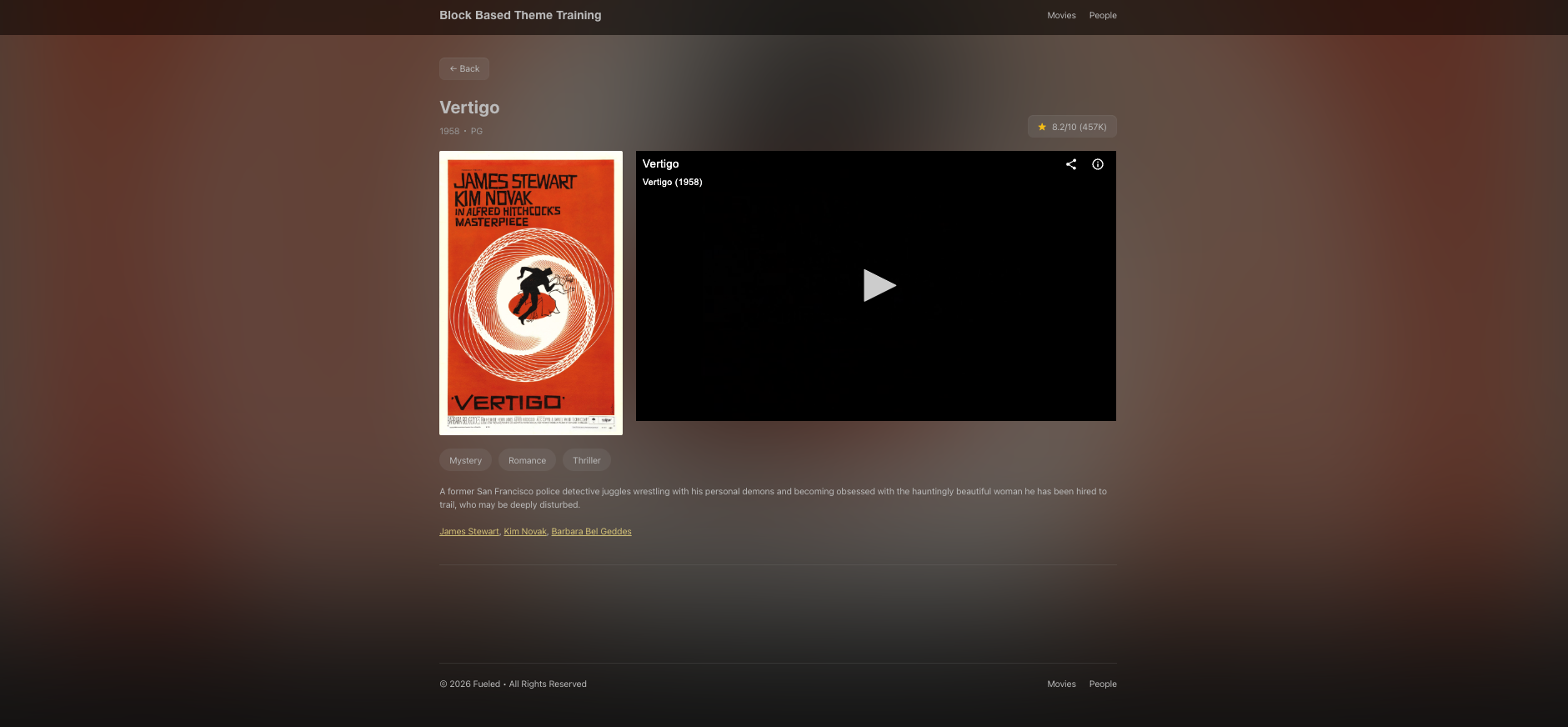
- Single Movie: backdrop image, metadata row (release year, MPA rating), two-column layout with poster and trailer, plot/stars sections
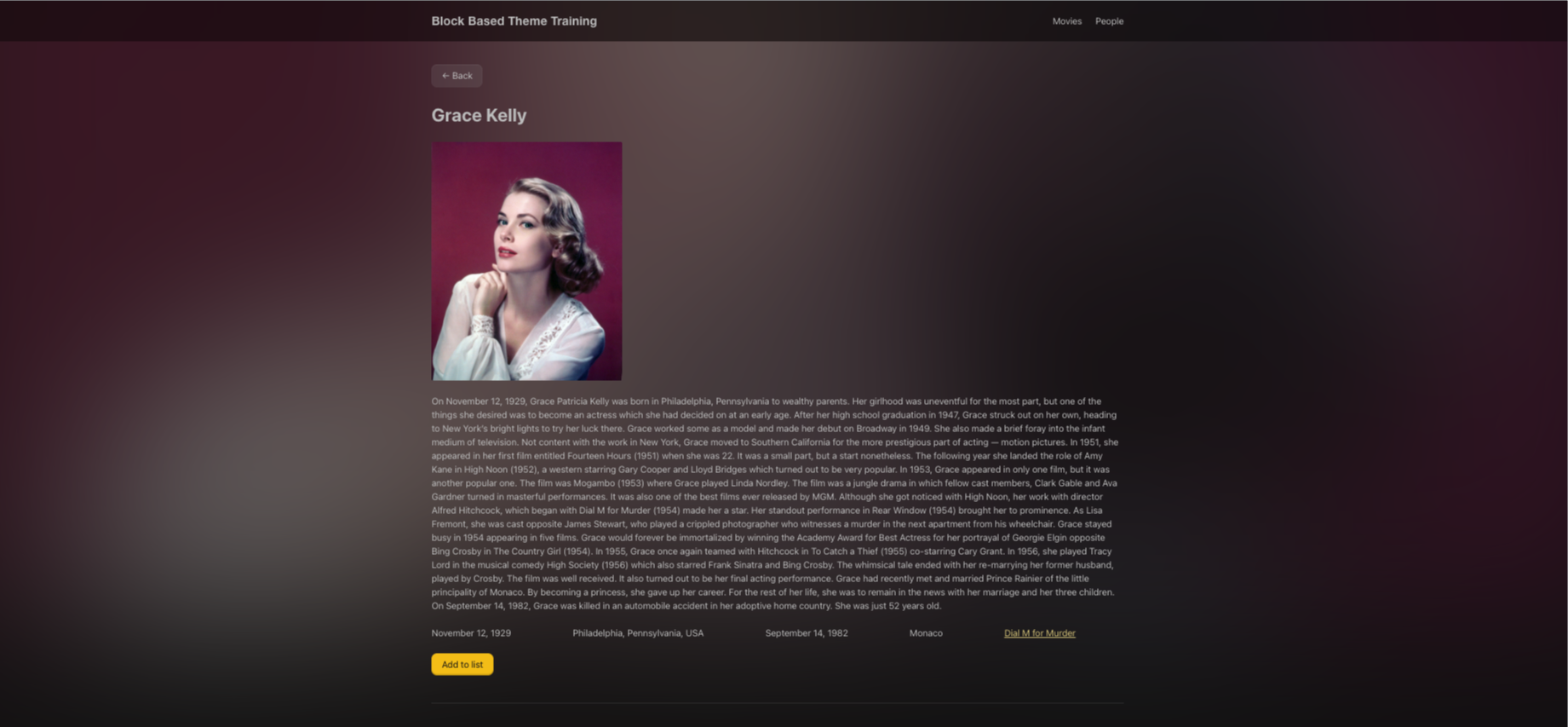
- Single Person: header with photo and biographical info, filmography section
These templates use simple Paragraphs for metadata right now. In Lesson 12, you'll revisit them to wrap metadata in tenup/dl blocks for semantic HTML. The metadata row uses a basic flex Group without the separator toggle, which comes in Lesson 11. The tenup/rate-movie block is added in Lesson 13.
Null and empty fallback strategy
Bound blocks always render their markup, even when the value is empty. An empty string results in an empty <p></p> on the frontend, which may appear as unwanted whitespace next to a label.
The theme uses two fallback strategies:
- Empty string for user-facing text: fields like
movieStarsintentionally return''when there's no data, though an "n/a" or "unavailable" fallback might make just as much sense. The DL blocks added in Lesson 12 will inherit this behavior. - Safe defaults for structural values:
archiveLinkUrlfalls back tohome_url()so the link always goes somewhere.viewerRatingLabelUrlreturns'#'as a no-op.
Bindings are not conditional: you can't hide a bound block entirely when the value is empty. The block always renders. Plan your fallbacks accordingly.
Files changed in this lesson
| File | Change type | What changes |
|---|---|---|
src/BlockBindings.php | New | Registers tenup/block-bindings source; routes 9 keys to helper methods; Content Connect queries for movieStars and personMovies; date formatting for personBorn/personDied; viewer rating with K notation for counts |
assets/js/block-bindings/index.js | New | Client-side registerBlockBindingsSource() with getValues() placeholders and getFieldsList() |
assets/js/block-extensions.js | Modified | Added import './block-bindings' |
patterns/single-movie-trailer.php | New | Conditional IMDB iframe embed or placeholder image based on tenup_movie_trailer_id meta |
templates/single-tenup-movie.html | Modified | Replaced placeholder with full layout using core/post-meta and tenup/block-bindings throughout |
templates/single-tenup-person.html | Modified | Replaced placeholder with full layout using core/post-meta and tenup/block-bindings throughout |
Ship it checkpoint
- Single movie pages show dynamic metadata (release year, MPA rating, plot, stars, viewer rating)
- Single person pages show dynamic metadata (biography, born, birthplace, died, deathplace, movies)
- Editor shows placeholder text for custom bindings
- Trailer embeds from IMDB, with placeholder for movies without trailers
- Back button navigates to the correct archive
Takeaways
- Block bindings let core blocks display dynamic values without custom blocks.
- You need both a PHP source (real values) and a JS source (editor previews).
- Seven core blocks support bindings out of the box. As of WP 7.0, any block can opt in via the
block_bindings_supported_attributesfilter. - Use
core/post-metafor simple meta display. Use a custom source for computed or formatted values. - Always handle null/empty values: bound blocks always render their markup.
- Bindings are not conditional: you can't hide a block based on whether a value exists.
- The trailer pattern shows how PHP conditional logic in patterns enables dynamic rendering.